Unified HR - An All-in-one HR Platform
Unified HR - An All-in-one HR Platform
Unified HR is a centralized platform that manages the entire employee lifecycle, from hiring to daily operations. It brings recruitment, employee records, attendance, and feedback into one intuitive system, eliminating fragmented tools and simplifying HR workflows.
Unified HR is a centralized platform that manages the entire employee lifecycle, from hiring to daily operations. It brings recruitment, employee records, attendance, and feedback into one intuitive system, eliminating fragmented tools and simplifying HR workflows.
CoMPANY
Onarvo
ROLE
Product Designer
EXPERTISE
Product Design
YEAR
2025
CoMPANY
Onarvo
ROLE
Product Designer
EXPERTISE
Product Design
YEAR
2025
Project Overview
Project Overview
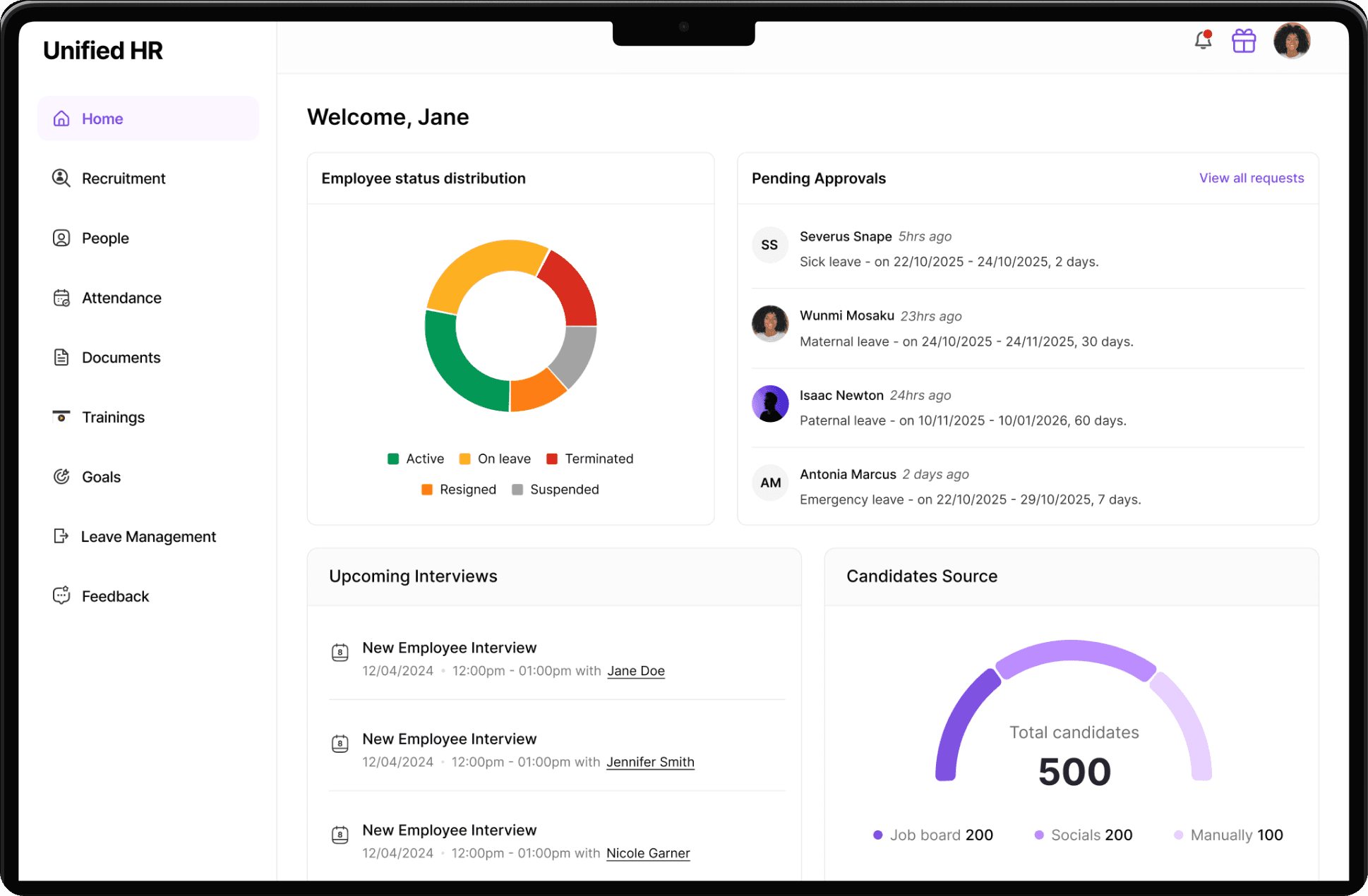
This product is an HR Management Platform designed to help organizations manage their people, processes, and internal operations from a single system. The goal was to create a clear, scalable, and easy-to-use HR solution that supports the full employee lifecycle, from hiring to daily workforce management.
The platform is designed around two core user experiences: HR Managers/Admins and Employees. HR Managers/admins manage hiring pipelines, employee records, leave requests, document storage, and other HR operations, while employees access personal dashboards to request leave, give and receive feedback, and track goals.
This product is an HR Management Platform designed to help organizations manage their people, processes, and internal operations from a single system. The goal was to create a clear, scalable, and easy-to-use HR solution that supports the full employee lifecycle, from hiring to daily workforce management.
The platform is designed around two core user experiences: HR Managers/Admins and Employees. HR Managers/admins manage hiring pipelines, employee records, leave requests, document storage, and other HR operations, while employees access personal dashboards to request leave, give and receive feedback, and track goals.
Operation Challenges in HR Management
Operation Challenges in HR Management
Small to mid-sized HR teams often experience tool fatigue, relying on multiple disconnected systems such as spreadsheets for attendance tracking, emails for recruitment, Excel files for employee records, and physical folders for document storage. This fragmented/scattered approach leads to delayed approvals and communication, poor visibility into attendance and documentation, scattered or incomplete employee data, and inefficient hiring workflows.
Small to mid-sized HR teams often experience tool fatigue, relying on multiple disconnected systems such as spreadsheets for attendance tracking, emails for recruitment, Excel files for employee records, and physical folders for document storage. This fragmented/scattered approach leads to delayed approvals and communication, poor visibility into attendance and documentation, scattered or incomplete employee data, and inefficient hiring workflows.
What I Wanted to Achieve
What I Wanted to Achieve
I designed Unified HR to centralize essential HR workflows into a single platform. HR managers can create job postings, manage candidates through a structured hiring pipeline, and communicate with applicants using built-in email tools. Successful candidates transition seamlessly into employee records, with support for manual employee creation when needed.
The platform also includes document storage, attendance tracking for check-ins and absences, and other essential HR tools. By consolidating processes that small companies typically manage across multiple disconnected tools, Unified HR simplifies workflows, and reduces operational overhead.
I designed Unified HR to centralize essential HR workflows into a single platform. HR managers can create job postings, manage candidates through a structured hiring pipeline, and communicate with applicants using built-in email tools. Successful candidates transition seamlessly into employee records, with support for manual employee creation when needed.
The platform also includes document storage, attendance tracking for check-ins and absences, and other essential HR tools. By consolidating processes that small companies typically manage across multiple disconnected tools, Unified HR simplifies workflows, and reduces operational overhead.
Who is it for?
Who is it for?
HR Managers
Admins
Employees (to manage their profile)
Key Features & Breakdown
Key Features & Breakdown
Recruitment Management
Recruitment Management
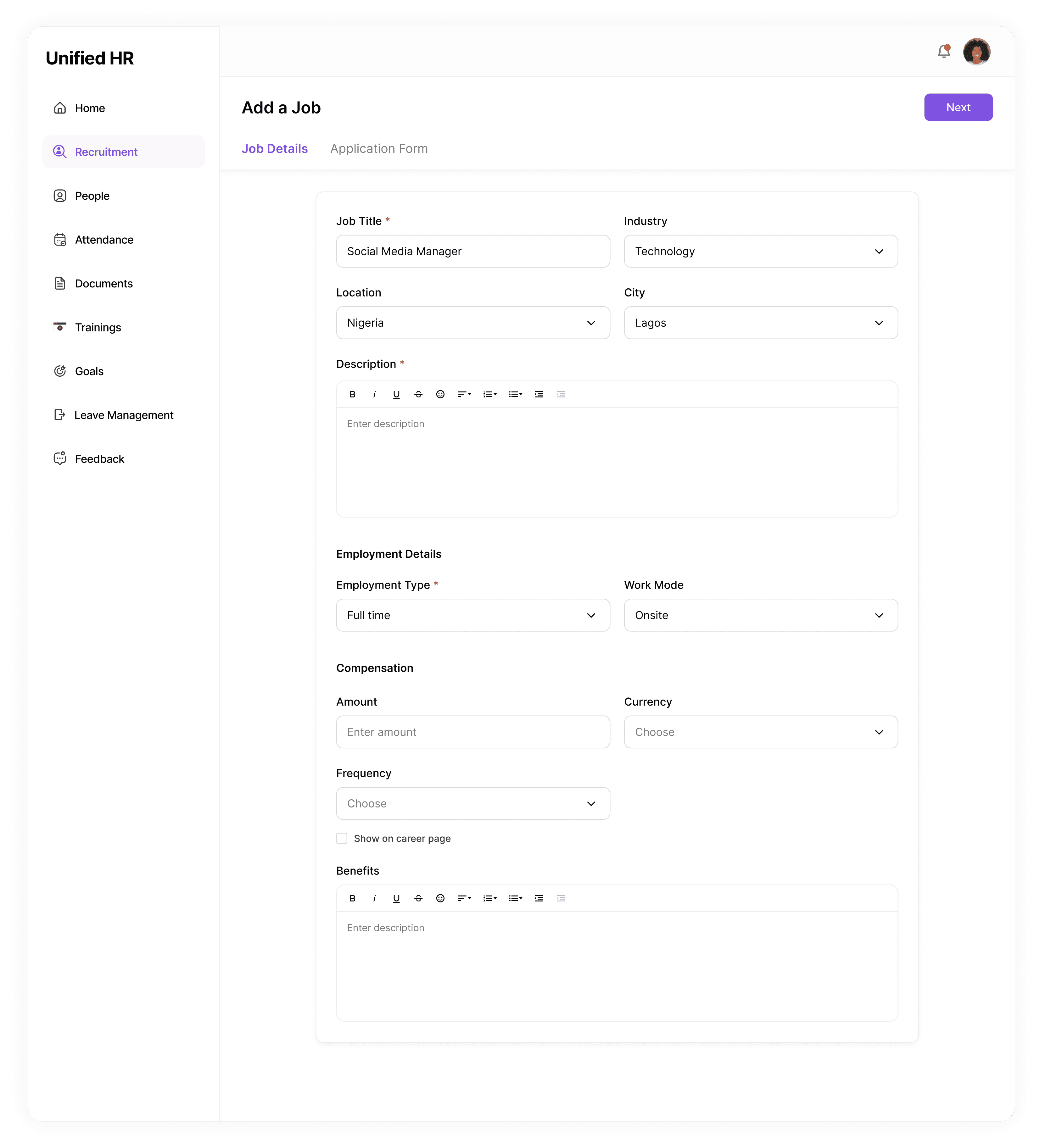
Recruitment management enables HR Managers to seamlessly create job postings by specifying key details such as job title, job type, salary range, job description, etc. They can also create customised application forms to collect applicants information, including name, email address, CV, educational background, and work experience. The jobs can then be published on a career page, allowing candidates to view, apply for available positions and even share. Below is a step-by-step overview of how job postings are created, application forms are customized, and the job postings are published to the company’s career page.
Recruitment management enables HR Managers to seamlessly create job postings by specifying key details such as job title, job type, salary range, job description, etc. They can also create customised application forms to collect applicants information, including name, email address, CV, educational background, and work experience. The jobs can then be published on a career page, allowing candidates to view, apply for available positions and even share. Below is a step-by-step overview of how job postings are created, application forms are customized, and the job postings are published to the company’s career page.
Career Page
Career Page
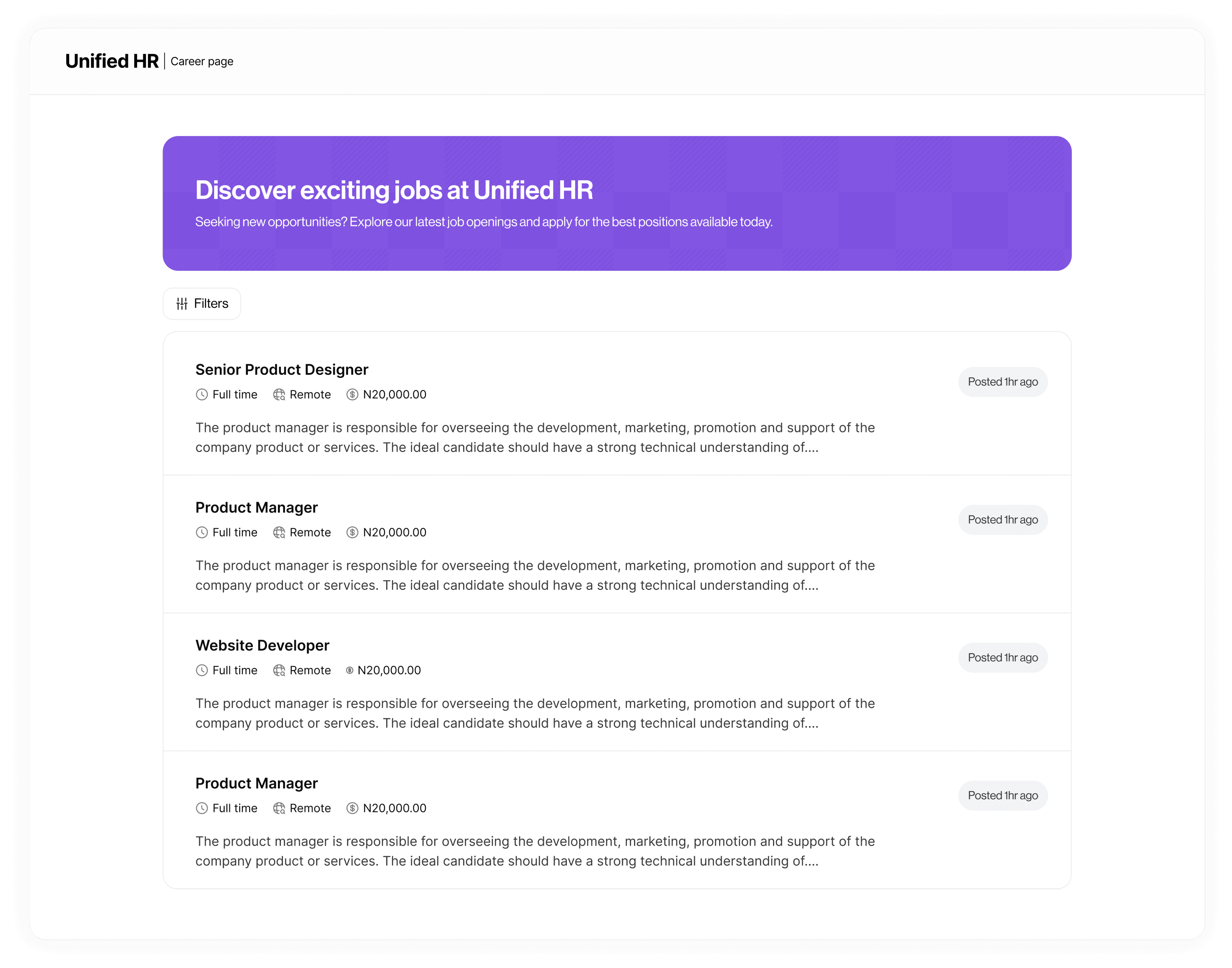
The job postings from Recruitment are published on the company’s dedicated career page, ensuring accessibility for potential applicants and enhancing visibility. Applicants can browse job listings, filter them based on their preferences, and apply. Once applications are submitted, they flow back into the platform and are managed through a structured recruitment process:
The job postings from Recruitment are published on the company’s dedicated career page, ensuring accessibility for potential applicants and enhancing visibility. Applicants can browse job listings, filter them based on their preferences, and apply. Once applications are submitted, they flow back into the platform and are managed through a structured recruitment process:
Candidate Pipeline: Applications flow directly back into the app, where HR can move candidates through custom stages (e.g., Applied, Screened, Interview, Offered).
Candidate Pipeline: Applications flow directly back into the app, where HR can move candidates through custom stages (e.g., Applied, Screened, Interview, Offered).
Integrated Communication: HR Managers schedule interviews via email directly from the candidate’s profile, keeping all correspondence in one place.
Integrated Communication: HR Managers schedule interviews via email directly from the candidate’s profile, keeping all correspondence in one place.
Automatic Employee Creation: When a candidate is hired, an employee record is automatically created, allowing further edits and updates after onboarding.
Automatic Employee Creation: When a candidate is hired, an employee record is automatically created, allowing further edits and updates after onboarding.
Below is a step-by-step flow of the process
Below is a step-by-step flow of the process
People Management
People Management
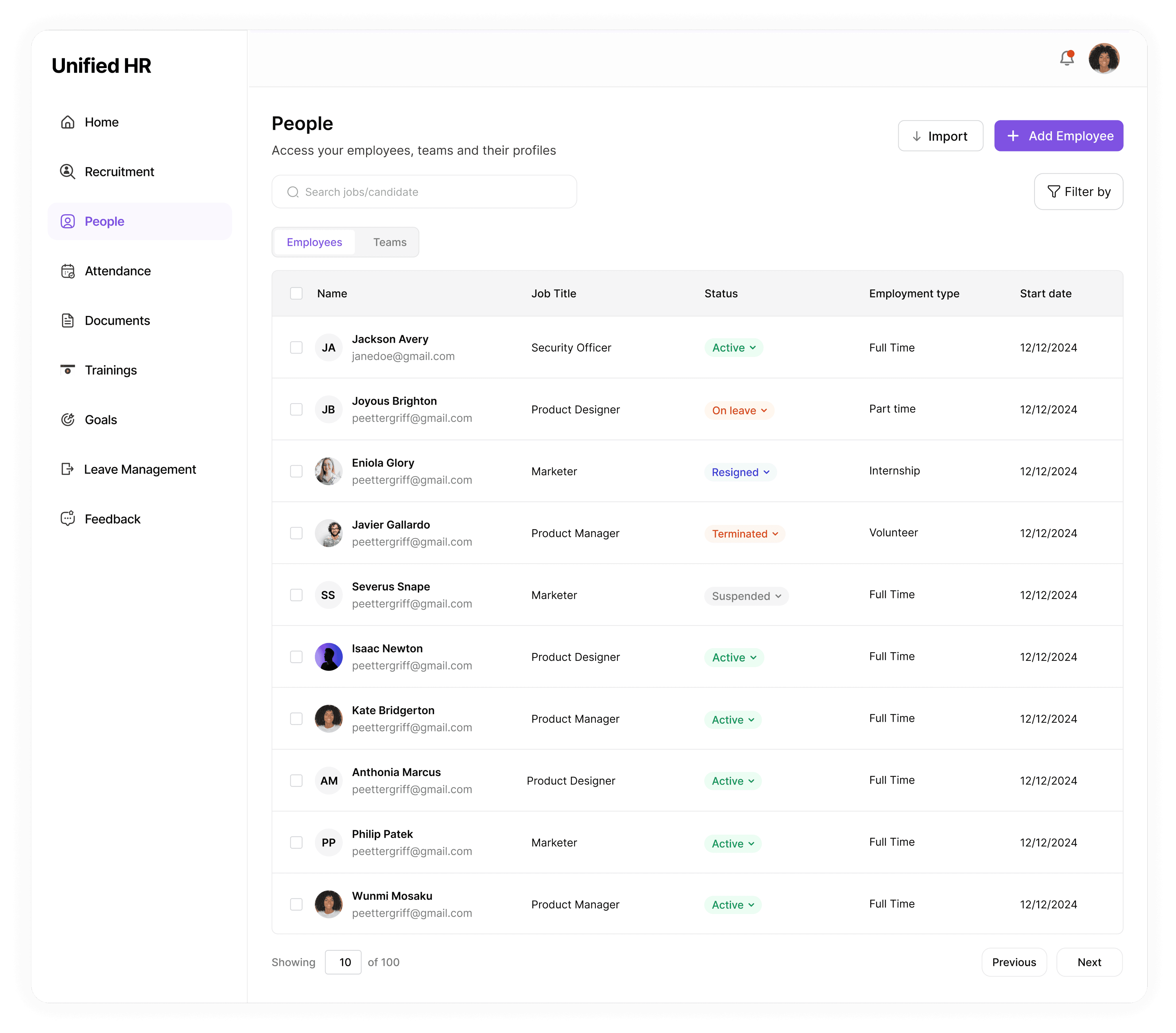
The People Management section is where all employee information is stored and managed. It helps the company keep track of staff details such as names, roles, departments, and work status. Employees can be added manually by an admin or automatically moved from the recruitment section once they are hired. This makes it easy to bring new employees into the system without having to start over. HR managers can also update employee details, change their status, or view records at any time, making it easier to manage everyone in one place.
The People Management section is where all employee information is stored and managed. It helps the company keep track of staff details such as names, roles, departments, and work status. Employees can be added manually by an admin or automatically moved from the recruitment section once they are hired. This makes it easy to bring new employees into the system without having to start over. HR managers can also update employee details, change their status, or view records at any time, making it easier to manage everyone in one place.
Below is a step-by-step flow of the process
Below is a step-by-step flow of the process
Attendance Management
Attendance Management
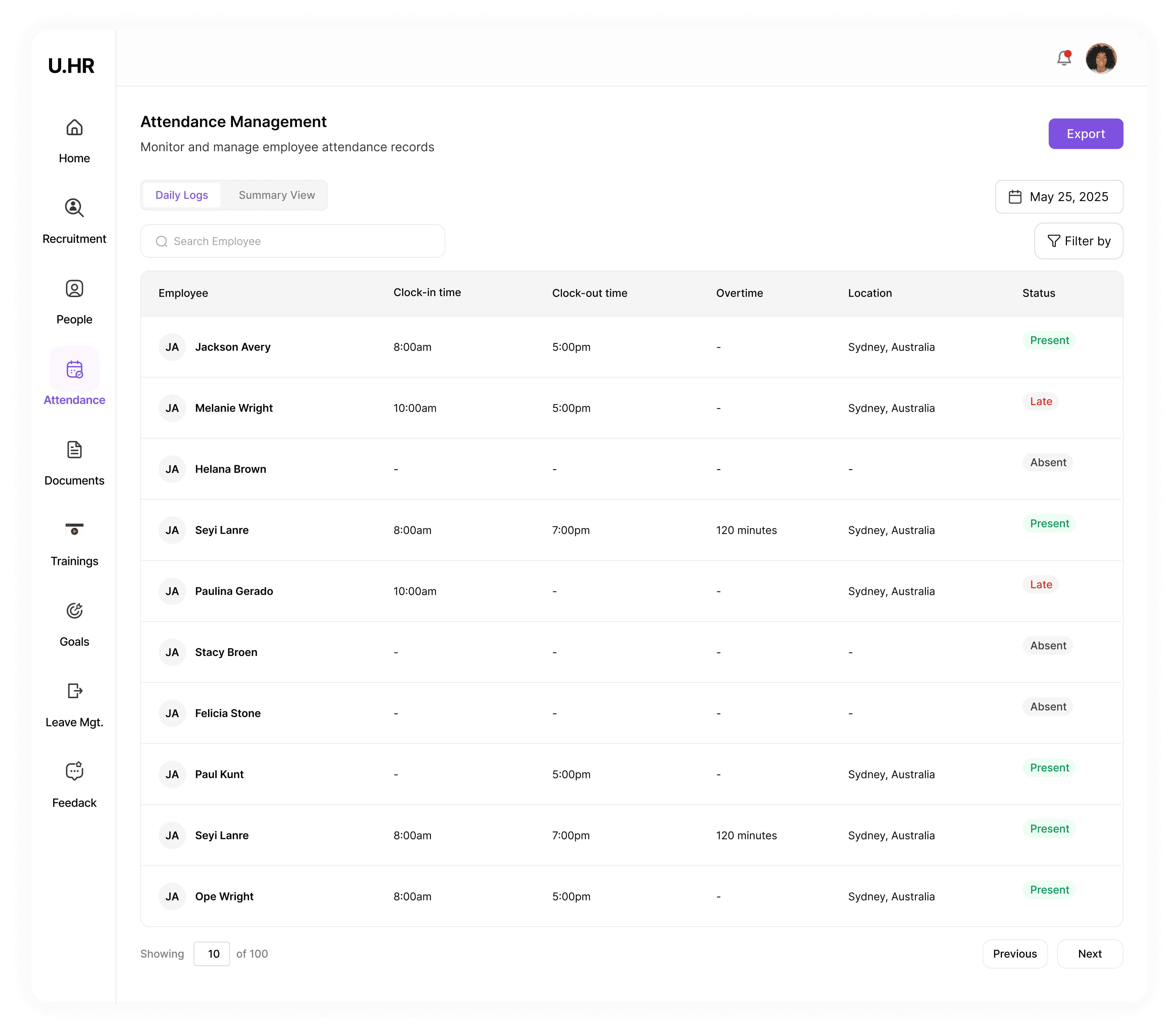
The Attendance feature helps the company keep track of when employees come to work and when they leave. Employees can check in at the start of their workday and check out when they’re done. HR managers/admins can view each employee’s check-in and check-out times in real time to see who is present or absent. In addition to that, the system keeps records of all attendance history, so admins can look back at past dates to monitor patterns, track punctuality, and manage attendance reports easily.
The Attendance feature helps the company keep track of when employees come to work and when they leave. Employees can check in at the start of their workday and check out when they’re done. HR managers/admins can view each employee’s check-in and check-out times in real time to see who is present or absent. In addition to that, the system keeps records of all attendance history, so admins can look back at past dates to monitor patterns, track punctuality, and manage attendance reports easily.
Below is a step-by-step flow of the process
Below is a step-by-step flow of the process
Document Management
Document Management
The Document Management feature allows both admins and employees to safely store and manage important files in one place. Users can upload files, create and save documents, and organize them into folders for better structure. Each user’s documents are stored securely, ensuring that only authorized people can view or access them. This feature also makes it easier for employees to share necessary files with HR or managers while keeping private information protected
The Document Management feature allows both admins and employees to safely store and manage important files in one place. Users can upload files, create and save documents, and organize them into folders for better structure. Each user’s documents are stored securely, ensuring that only authorized people can view or access them. This feature also makes it easier for employees to share necessary files with HR or managers while keeping private information protected
Below is a step-by-step flow of the process
Below is a step-by-step flow of the process

Leave Management
Leave Management
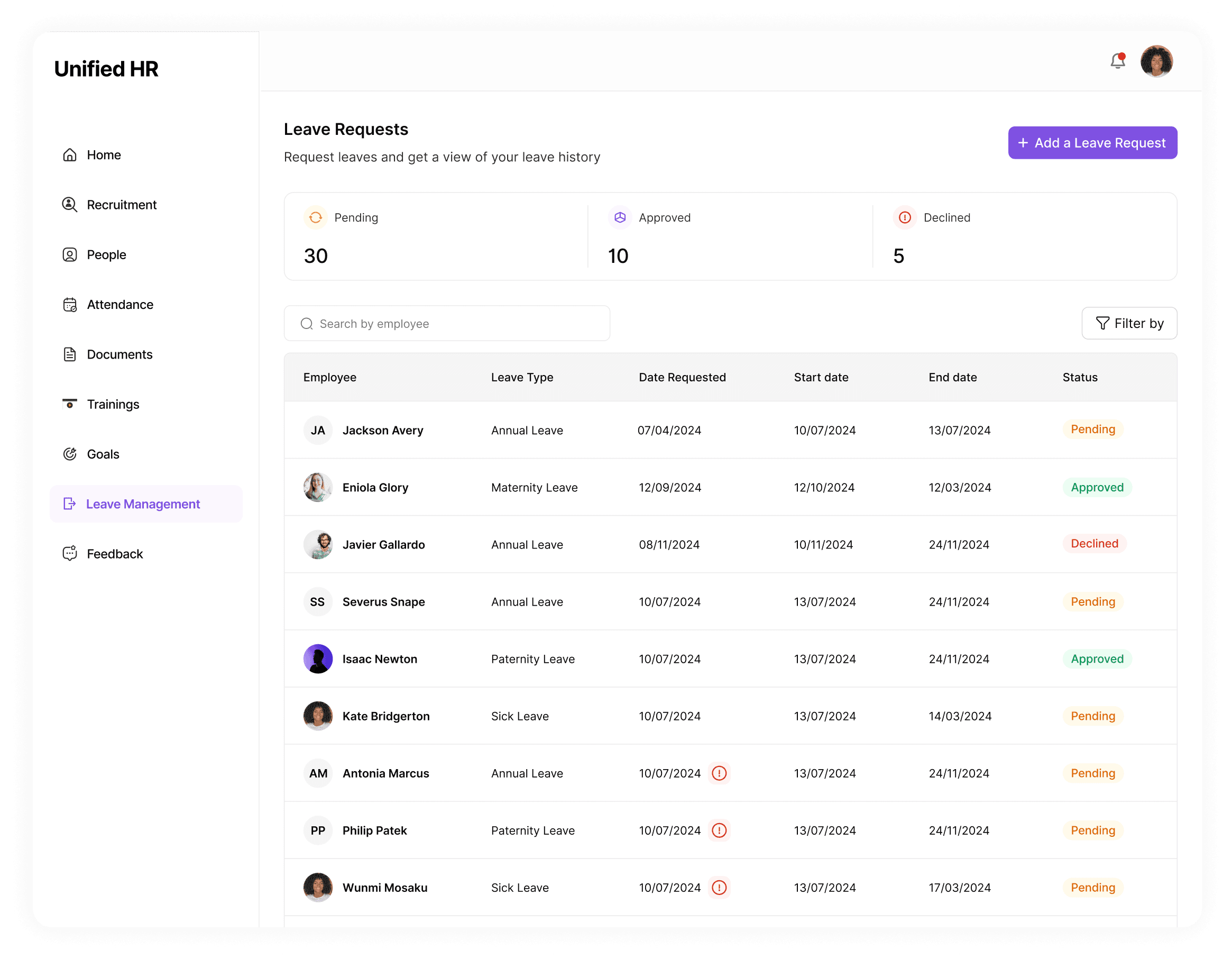
The Leave Management feature helps both HR Managers and employees handle leave requests easily and in one place. Employees can submit leave requests directly through the platform, including details like the type of leave, start and end dates, and any notes they want to add.
HR Managers can view all upcoming leaves, see who will be away, and approve or reject requests with just a few clicks. This makes it easier to plan ahead and manage workloads when someone is on leave.
The Leave Management feature helps both HR Managers and employees handle leave requests easily and in one place. Employees can submit leave requests directly through the platform, including details like the type of leave, start and end dates, and any notes they want to add.
HR Managers can view all upcoming leaves, see who will be away, and approve or reject requests with just a few clicks. This makes it easier to plan ahead and manage workloads when someone is on leave.
Feedback
Feedback
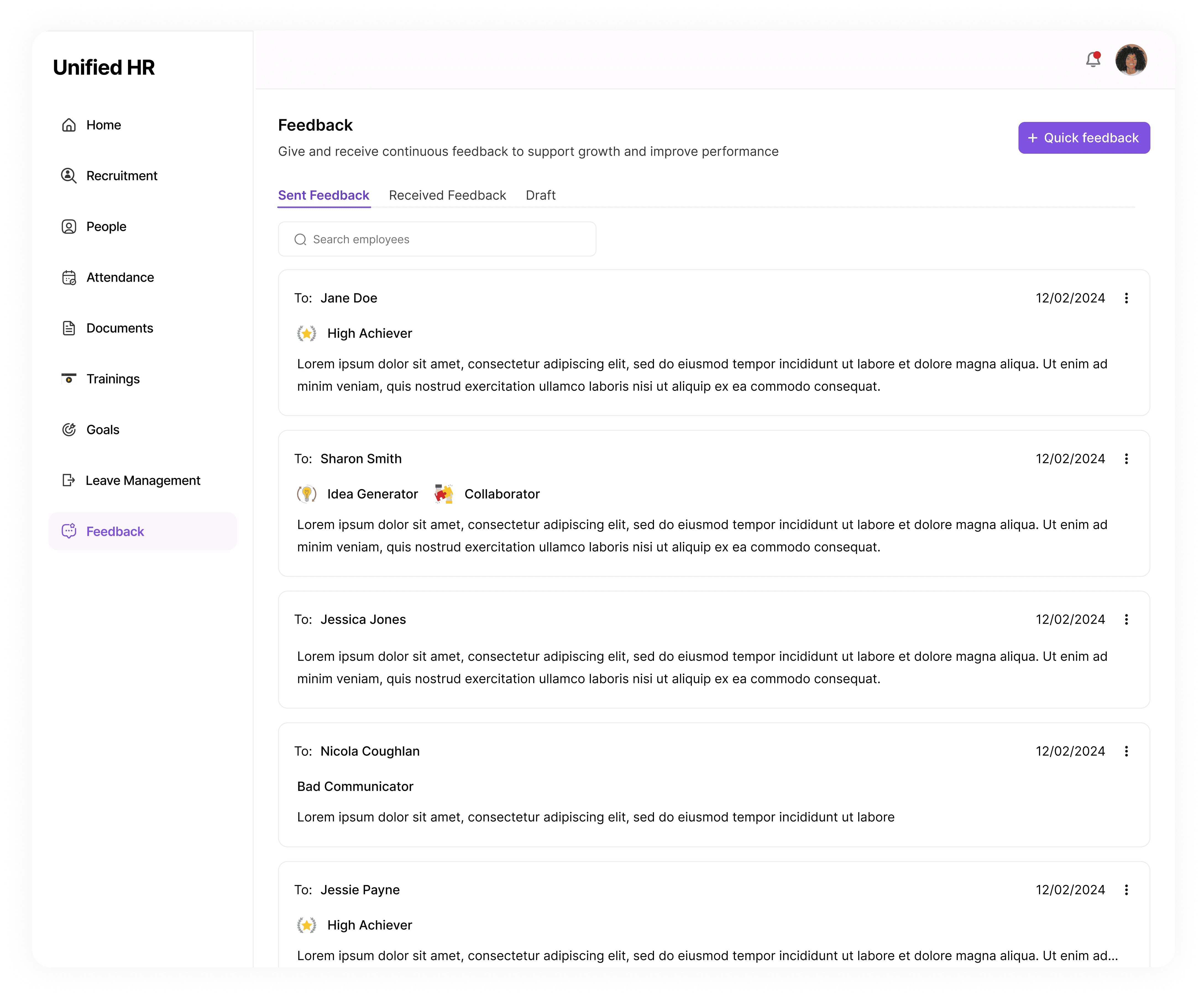
The Feedback feature allows admins to share performance comments with employees, for example, praising good work or suggesting improvements. Employees can also give feedback to their colleagues, helping build better communication and teamwork within the company.
The Feedback feature allows admins to share performance comments with employees, for example, praising good work or suggesting improvements. Employees can also give feedback to their colleagues, helping build better communication and teamwork within the company.
Outcome
Outcome
Reduced Tool Fatigue: By consolidating recruitment, leave management, attendance, amongst others, into a single platform, the system eliminates the "context switching", HR managers no longer need to jump between multiple tools to complete a single employee onboarding, daily check-in, access employee records, or view requests
Reduced Tool Fatigue: By consolidating recruitment, leave management, attendance, amongst others, into a single platform, the system eliminates the "context switching", HR managers no longer need to jump between multiple tools to complete a single employee onboarding, daily check-in, access employee records, or view requests
Unified Workflow: Successfully consolidated seven distinct HR functions (Recruitment, Records, Attendance, Documents, Feedback (Trainings and Goals) into a single, cohesive interface.
Unified Workflow: Successfully consolidated seven distinct HR functions (Recruitment, Records, Attendance, Documents, Feedback (Trainings and Goals) into a single, cohesive interface.
Reduced Context Switching: By housing the email service and hiring pipeline in one place, the design eliminates the need for users to toggle between external email clients and the HR platform.
Reduced Context Switching: By housing the email service and hiring pipeline in one place, the design eliminates the need for users to toggle between external email clients and the HR platform.
Key Takeaways
Key Takeaways
System Architecture: I learned how to manage complex data transitions, specifically the logic required to convert a "Candidate" profile into an "Employee" record without data loss or duplication.
System Architecture: I learned how to manage complex data transitions, specifically the logic required to convert a "Candidate" profile into an "Employee" record without data loss or duplication.
Workflow Optimization and Connection: Developed a deep understanding of the HR lifecycle. I realized that the value of an HR tool isn't just in its features, but in how well it connects different departments (e.g., how recruitment flows into attendance and documentation).
Workflow Optimization and Connection: Developed a deep understanding of the HR lifecycle. I realized that the value of an HR tool isn't just in its features, but in how well it connects different departments (e.g., how recruitment flows into attendance and documentation).
Integration Challenges: Implementing an integrated email service taught me the importance of centralized communication to prevent information silos within a team.
Integration Challenges: Implementing an integrated email service taught me the importance of centralized communication to prevent information silos within a team.
THANK YOU
THANK YOU
THANK YOU